
Lean PlanDo manual › Templates
Flow templates
Find, filter, publish and create the form templates your project uses in the Templates tab of Lean PlanDo Flow.
The Templates tab holds the forms your project uses.
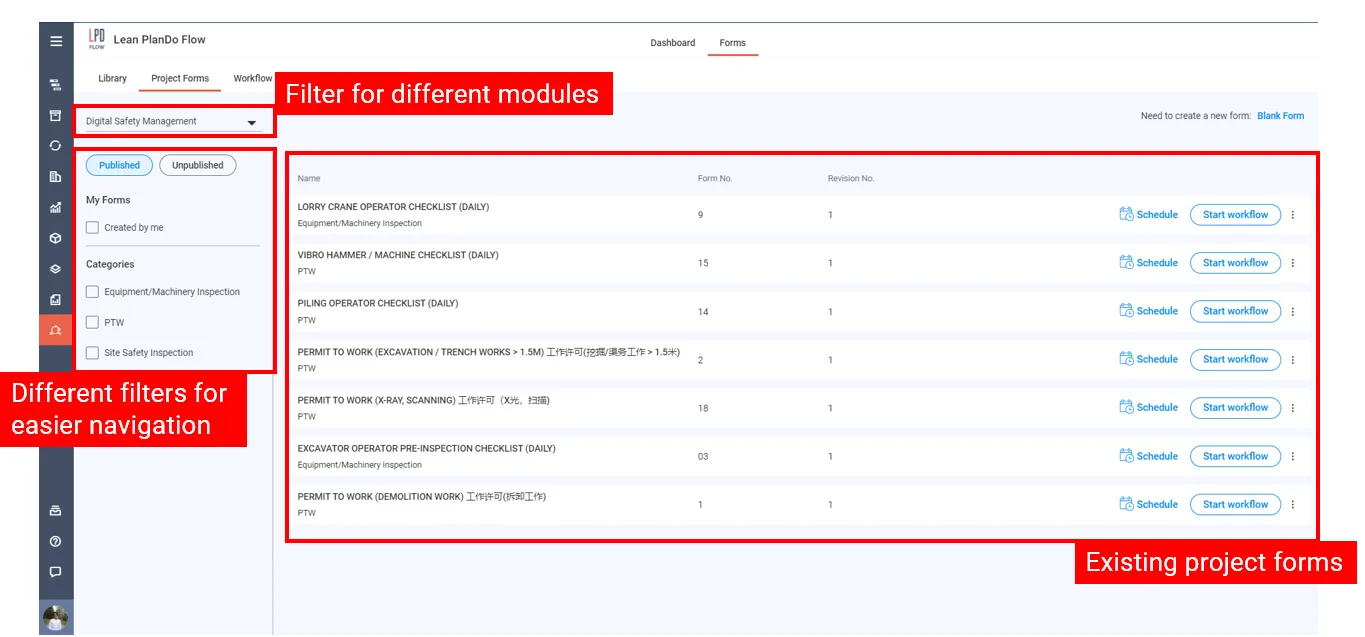
Filter the list
- Use the drop-down at the top to pick the discipline.
- Choose Published or Unpublished to see templates with that status.
- Under My Forms, tick Created by me to see only the templates you created.
- Tick one or more Categories to narrow the list further.
The right side shows the templates that match.
Publish a template
Only published templates can start a workflow.
- Choose Unpublished.
- Click Publish on the template's row. Lean PlanDo shows Publishing form, and the template moves under Published.
You can also click Publish at the top of the open form. If you do not see Publish, the form is already published or you do not have permission to publish forms.
Create a template
You can create a template in two ways:
- From the Library. See Library.
- From a blank form. See Create a blank template.
Last updated 2023-07-19. Part of Templates in the Lean PlanDo manual. Lean PlanDo by Lean Station.