
Lean PlanDo manual › Lookahead
Commit a task to the Do tab
Commit a constraint-free task in the Lookahead so it appears in the Do tab for the Do week.
Commit a task to take up its work in the Do week (the first week of the Lookahead, where tasks can be committed; it should be the current calendar week). Committed tasks appear in the Do tab, where you update their progress for that week.
Getting people to commit to their work makes projects productive and builds a positive team culture. Subcontractors and site supervisors review the current week's plan together. They commit only to the work they can achieve that week.
You can commit only constraint-free tasks: all constraints on the task must be Done. You can commit a task when its start date falls between the Lookahead start and the end of the Do week (both days included), it has not started, and you have permission to commit tasks. You then update its progress for that week.
You can commit a task from its Mini Widget or from its Detailed View.
Commit from the Mini Widget
- Click the task bar in the Gantt chart to open the Mini Widget.
- Switch on Commit. The switch then reads Committed.
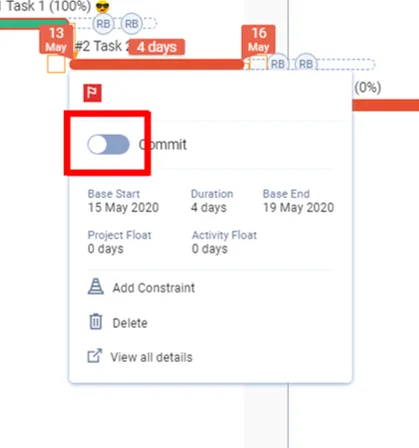
Commit from the Detailed View
- Double-click the task bar to open the Detailed View.
- Switch on the commit switch at the top right of the header. It has no text label.
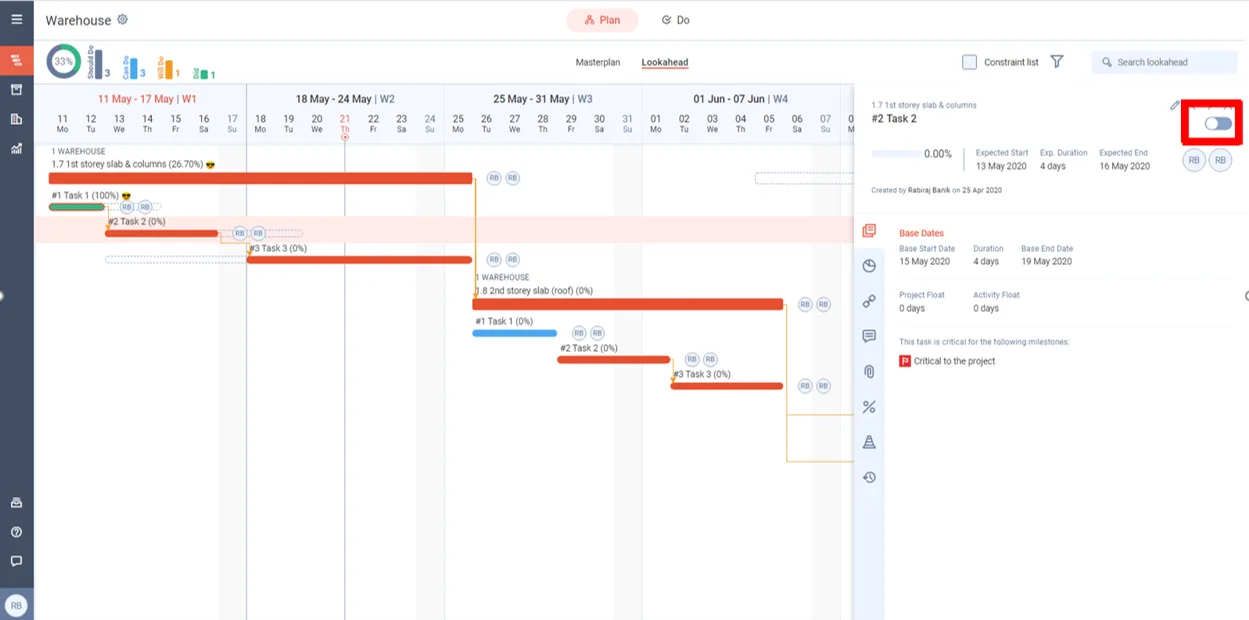
After you commit
The task bar turns orange and the task appears in the weekly Do tab. Add Constraint and Delete no longer appear in its Mini Widget.
Click the Do tab to see the tasks committed for this week.
Change a committed task
You can change a committed task's start date or duration before you update its progress. See Edit a task.
After you update progress, the fields read Rem. Early Start and Rem. Duration. You can still change them until the task has an actual end, but the start can only move to after the last progress date. The actual start cannot be edited. To change it, reset the progress from the Do tab (see Reset progress).
Last updated 2020-05-21. Part of Lookahead in the Lean PlanDo manual. Lean PlanDo by Lean Station.