
Lean PlanDo manual › Lookahead
Save an activity as a template
Save an activity's tasks and constraints as a template so you can reuse them on similar activities in the Lookahead.
Save an activity as a template when other similar activities need the same tasks and constraints. This saves time in Lookahead planning (the Lookahead is the 6-week or 8-week plan where activities are broken down into smaller tasks).
Splitting activities into tasks (smaller construction sequences) can be tedious on a complex plan with many activities. A template saves an activity's planned structure, its tasks and constraints, as a reusable copy for similar activities. For example, the tasks and constraints for "Basement slab" in Zone 1 are more or less the same for the same activities in Zone 2 and Zone 3. Plan Zone 1, save it as a template, then apply it to Zone 2 and Zone 3.
Save a template
-
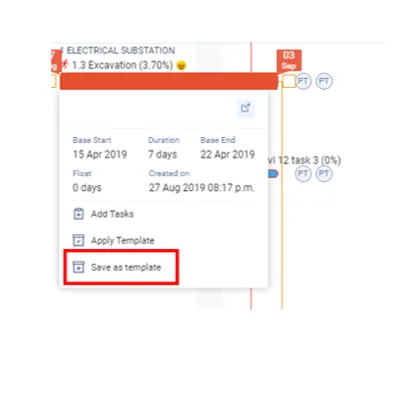
Click the activity bar to open its options menu.
-
Click Save as template. This option appears in the activity widget only once the activity has tasks.
-
In the Save as template pop-up, enter the Template Name.
-
Enter the Description.
-
Select the Trade.
-
To make the template public, tick Make it Public. Leave it unticked to keep it private to your project.
-
Click Save.
Template Name, Description and Trade are all required.
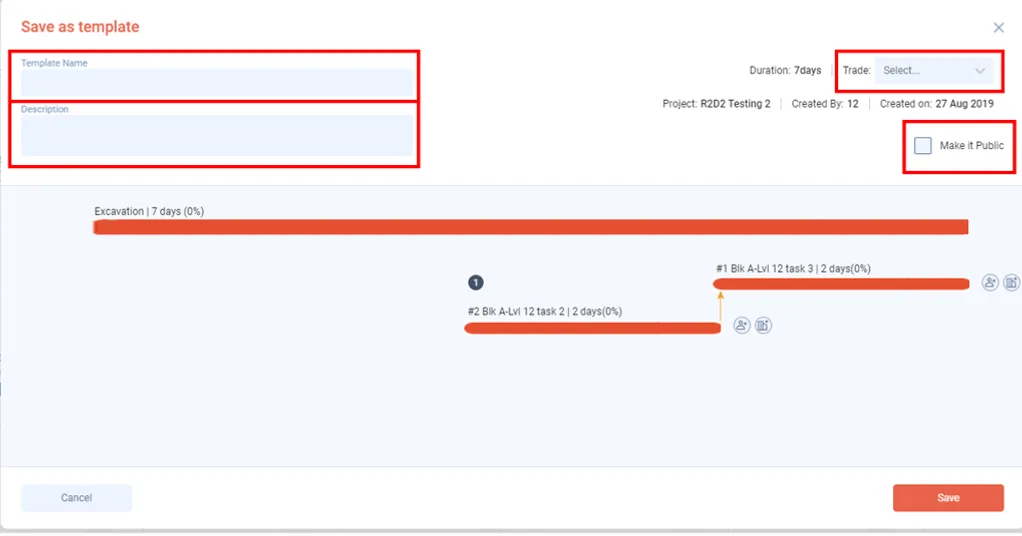
A public template is available to other projects in the same company as the template's creator. A private template is available only in this project.
Once saved, you can open the template from a different activity and apply the template to it.
Last updated 2023-07-10. Part of Lookahead in the Lean PlanDo manual. Lean PlanDo by Lean Station.