
Lean PlanDo manual › LPD Flow
User roles in Lean PlanDo Flow
See the roles a user can have in Lean PlanDo Flow, by company type, and read the table of what each role can do.
Each user in Lean PlanDo Flow has a role, based on the company they belong to. The roles are listed below by company type. The table at the end shows the access rights of each role.
Main contractor
Construction team
- Project Director (PD)
- Project Manager (PM)
- Construction Manager / Site Manager (CM/SM)
- Planner (PL)
- Engineer/Coordinator (PE/CO)
- Site Supervisor (SS)
Safety team
- Safety Manager (SM)
- Safety Coordinator (SC)
- Risk Management Facilitator (RMF)
Quality team
- QA/QC Manager (QA/QC Mr)
- QA/QC Engineer (QA/QC Er)
Sub-contractor
- Project Manager (PM) / Lean Engineer (LE)
Client
- Project Manager (PM)
- Higher Management Level (HML)
- Planner (PL)
- Engineer/Coordinator (E/C)
- Supervisor
Consultants
- Supervisory Officer Representative (SO)
- Architect/Engineer (AR/ER)
- RE/RTO
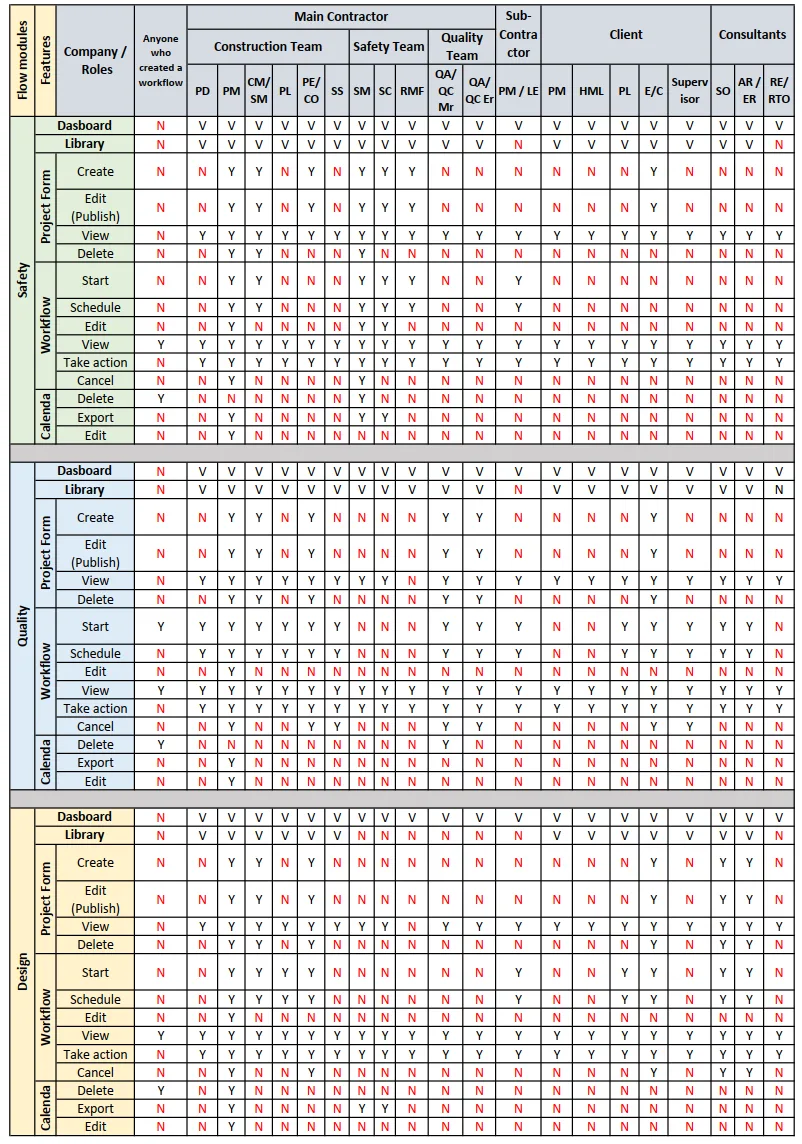
Access rights table
The table shows the rights each role has over each feature in Lean PlanDo Flow. The roles are listed on the left. The access types for each module are in the right-hand column, named Access.
- Y = Yes
- V = View
- N = No
To see what a role can do, follow its column on the left. For example, in the Main Contractor section, the Project Manager (PM) column shows Y or V for every module, feature and access type. So this role can use every feature in Lean PlanDo Flow. The Site Supervisor (SS) column shows N for some features, such as creating and editing templates, starting a workflow and scheduling a workflow. So a Site Supervisor cannot use those features.
For access rights in Lean PlanDo Project, read Project user roles.
Last updated 2022-06-08. Part of LPD Flow in the Lean PlanDo manual. Lean PlanDo by Lean Station.