
Lean PlanDo manual › Lookahead
Add a task constraint
Add a constraint to a task in the Lookahead, set its steps and due dates, and read its colour and status.
Add a constraint to a task to track what must be done before the task starts. A constraint is work that must be cleared before a task can be done, such as getting site access. It can relate to a contract, approval, material, safety, engineering design, QA/QC or construction.
Manage and complete constraints well before the task's start date. A constraint shows as a circle on its planned due date, in line with its task. You can add task constraints only in the Lookahead.
Add a constraint
-
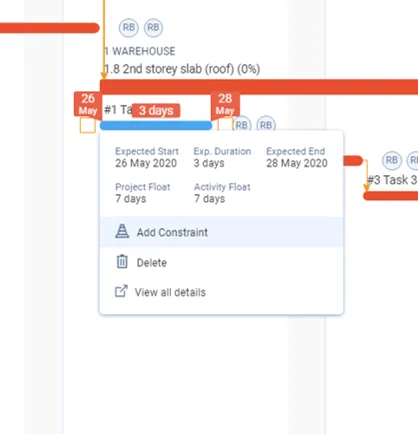
Click the task bar in the Gantt chart, then click Add Constraint. Or double-click the task bar, open the Constraints list tab and click Add New Constraint.
-
Choose Technical Constraint or Site Constraint.
-
In Select Constraint, pick the constraint. Constraints are listed as category - name.
-
Enter the Description.
-
Assign a user to the constraint with the Assignee button.
-
Set the Last Step Due Date and the ETA (see below), or keep the default ETA.
-
Set the due dates of the steps (a step is one part of a constraint; a step not done shows as an empty circle with a grey outline, a done step as a filled green circle).
-
If needed, click Customise steps to change the steps. Click + Add New Step to add one, or Reset to go back to the default steps.
-
Click Add Constraint to add the constraint to the task.
Repeat the steps to add more constraints to a task.
Good to know
-
ETA is the number of working days between the constraint's last step and the start of the task. The last step must be due at least that many working days before the start. With an ETA of 1, the constraint must be done by the working day before the task starts. With an ETA of 0, it can be done on the start day.
-
The constraint's due date always matches the due date of its last step. When the last step is completed, the constraint is completed.
-
The Last Step Due Date cannot be later than the task start minus the ETA in working days. It cannot be earlier than the Lookahead start.
-
Changing a step's date changes only that step. Later steps are not reset.
-
Step due dates cannot go backwards. Each step's due date must be the same as, or later than, the one before it.
-
Constraint status shows the actual state of a constraint. There are two:
- Not Done: the starting state. Shown in blue.
- Done: the completed state. Shown in green.
If today's date passes the constraint's due date and the status is still Not Done, the constraint shows as a red circle.
Activity constraints are added the same way. See Add an activity constraint.
Last updated 2023-07-10. Part of Lookahead in the Lean PlanDo manual. Lean PlanDo by Lean Station.