
Lean PlanDo manual › Insights
Workable backlogs
Read the Weekly Workable Backlog graph: Should Do, Can Do, Will Do and Did tasks for each Do week.
Use the Weekly Workable Backlog graph on the Overview tab to see, for each week, how many tasks were planned, ready, committed and done. It reflects in real time how well the project is planned and carried out.
The workable backlog counts tasks in each Do week (the first week of the Lookahead, where tasks can be committed; it should be the current calendar week):
- Should Do: the number of tasks in the Do week
- Can Do: the Should Do tasks with no open constraint on the task, on its activity, or on any task before it in the same activity. Dependencies on tasks in other activities do not count. A constraint is work that must be cleared before a task can be done, such as getting site access.
- Will Do: the Can Do tasks the project team has committed
- Did: the committed tasks completed in the Do week
The Lookahead and Do tab headers show the counters Should Do, Can Do, Will Do and Did.
These numbers show constraint management, site readiness, percent plan complete and plan reliability. See Commitment and reliability. To learn how the workable backlog works in the Lookahead (the 6-week or 8-week plan where activities are broken down into smaller tasks), read Workable backlog.
Read the graph
The graph shows the workable backlog numbers for each week of the project. In a sample project, in the week of 2 October 2018:
- Should Do = 118: 118 tasks should have been done that week.
- Can Do = 117: one task had a constraint, so it could not be done that week.
- Will Do = 104: of the 117 tasks that could be done, the team committed to only 104.
- Did = 78: of the 104 committed tasks, only 78 were done as planned. The rest were delayed or extended.
The graph also shows how tasks are committed and done over time. In the same sample project, the Should Do, Can Do, Will Do and Did numbers rose gradually between 22 May 2018 and 2 October 2018. This shows the team's performance and commitment improving, and helps them keep improving.
Exception: cross dependencies and Can Do
A task may be blocked only by a cross dependency (a dependency on a task in another activity). Cross dependencies do not affect Can Do, so the task is still counted.
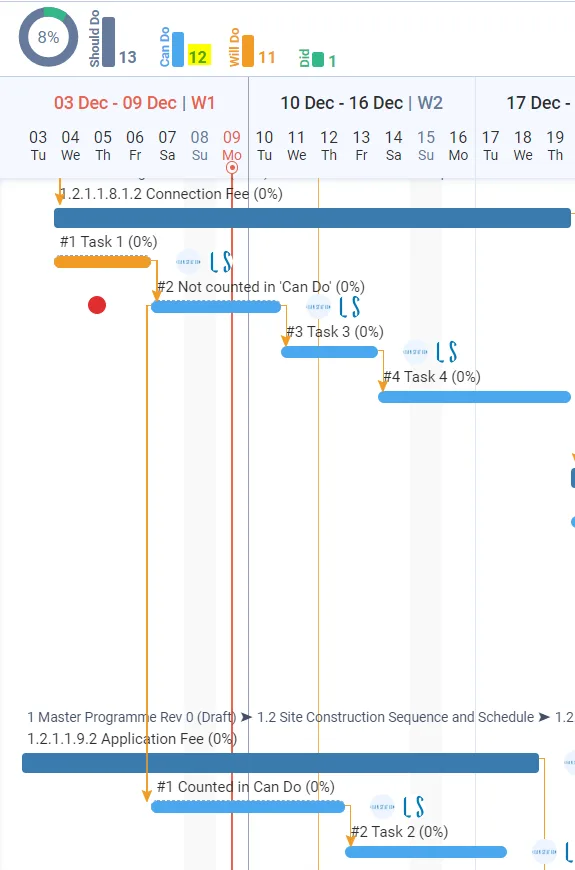
In this example:
- The task Not counted in 'Can Do' has a constraint, so it is not counted in Can Do.
- It has an SS0 successor (start to start, with a lag of 0; lag is the number of days added between a predecessor and its successor) called Counted in Can Do.
- So Counted in Can Do cannot be committed, but it is still counted in Can Do.
A task leaves Can Do only when a constraint on it, on its activity, or on a predecessor in the same activity is Not Done. Whether a predecessor has started does not matter.
Last updated 2020-03-31. Part of Insights in the Lean PlanDo manual. Lean PlanDo by Lean Station.