
Lean PlanDo manual › Lookahead
Uncommit a task from the Do tab
Uncommit a task in the Do week when its work cannot go ahead, from the Lookahead, the detailed view or the Dashboard.
Uncommit a task when its work cannot be carried out this week. Uncommitting rejects the task for the current week and takes it off the Do tab.
You can uncommit only a task in the Do week that has not started. A task with progress entered cannot be uncommitted.
There are three ways to uncommit a task.
From the task menu in the Lookahead
- Click the task bar in the Gantt chart to open the task menu.
- Switch off Committed.
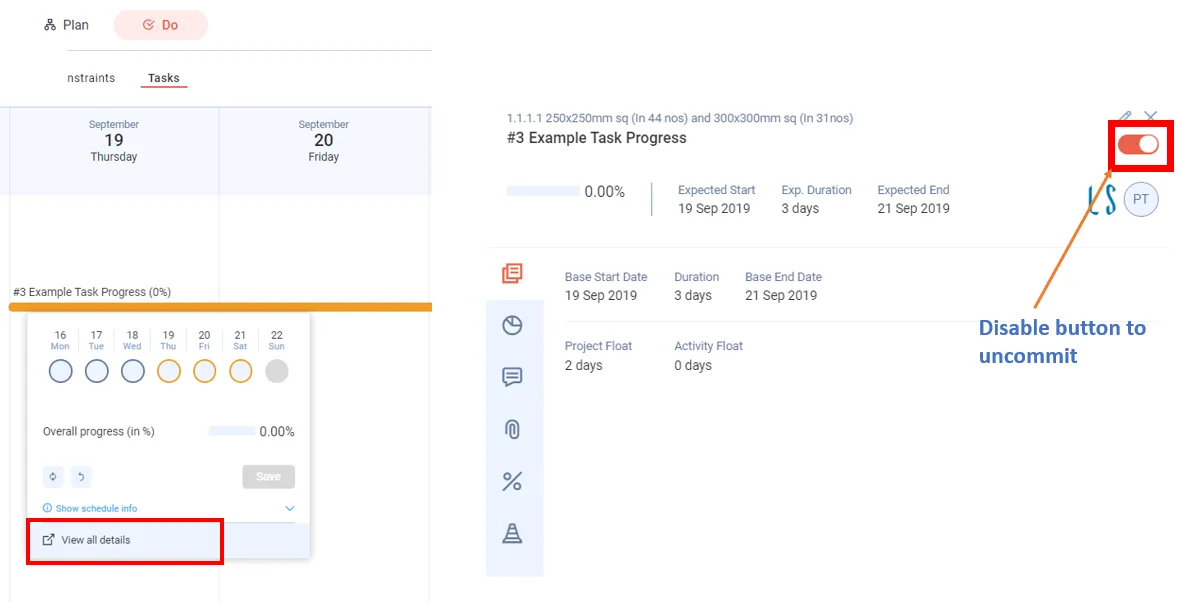
From the detailed view
- Click View all details in the task menu to open the detailed view. You can also reach it from the Do tab.
- Switch off the commit switch on the task in the activity's task list.
From the Dashboard
- Open the Dashboard's Do week task list.
- Click Un-Commit beside the task.
Last updated 2020-03-31. Part of Lookahead in the Lean PlanDo manual. Lean PlanDo by Lean Station.