
Lean PlanDo manual › Lookahead
Add a task prefix
Turn on task prefixes for an activity so every task name shows where it belongs, such as its zone and building level.
Use task prefixes to relate each task back to the activity it belongs to.
For example, use the first prefix for the zone the task is in, and the second for the building level.
- Open the detailed view of the activity.
- Go to Task list.
- Tick Enable prefix. Prefix 1 and Prefix 2 appear.
- Type the first prefix in Prefix 1. It is required.
- If needed, type the second prefix in Prefix 2.
- Click the tick to save the prefix for the activity. The X cancels.
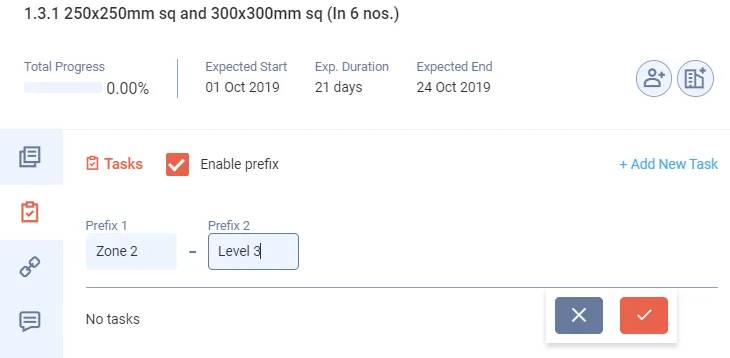
The task prefix applies to every task created under that activity. To remove it, untick Enable prefix. Lean PlanDo asks Are you sure you want to remove prefix?
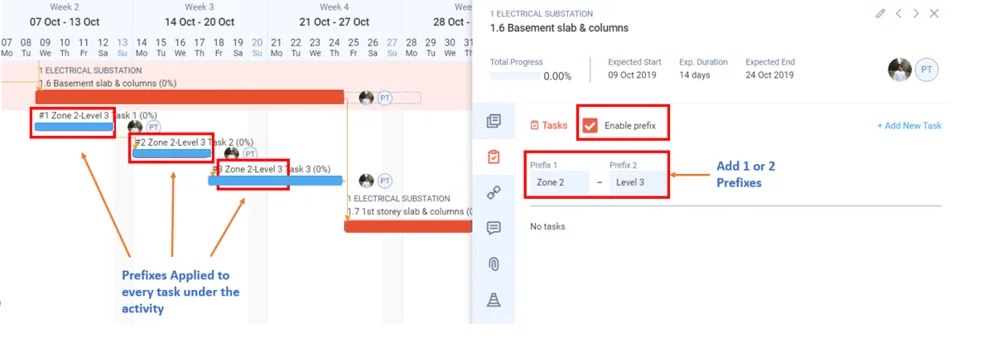
Watch how to create tasks and add task prefixes:
Last updated 2023-07-10. Part of Lookahead in the Lean PlanDo manual. Lean PlanDo by Lean Station.