
Lean PlanDo manual › Lookahead
Edit a task dependency
Change the type or lag of a task dependency, disable it or delete it, so the Lookahead matches the planned construction sequence.
You can edit a task dependency at any time. Change the type and lag of an existing dependency, or disable or delete the whole dependency, to match the planned construction sequence.
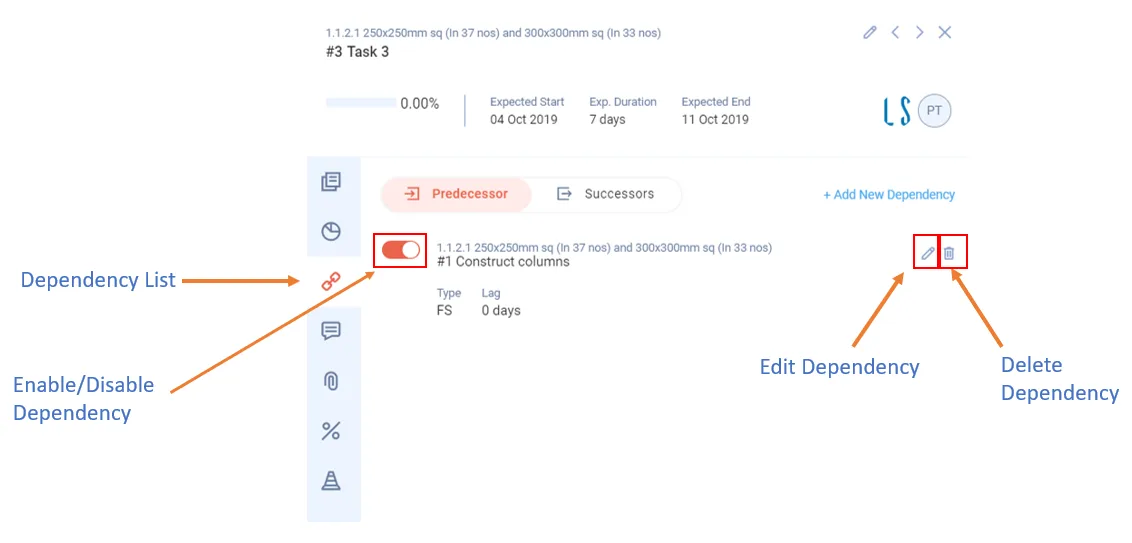
A task's dependencies are listed in its Dependency list tab. Lag is the number of days added between a predecessor and its successor.
Edit a dependency
- Double-click the task bar in the Gantt chart.
- Click Dependency list.
- Click Edit (pencil icon) beside the predecessor or successor task you want to change.
- Make the changes, then click Save to update the dependency.
Delete a dependency
- Click Delete (bin icon) beside the dependency.
You cannot edit or delete a dependency whose successor task is committed. Deleting also needs permission to delete task dependencies.
Enable or disable a dependency
Each dependency has an on/off switch at its left. It is on by default. Turn it off to disable the dependency.
Activity dependencies are edited the same way. See Edit an activity dependency.
Last updated 2023-07-10. Part of Lookahead in the Lean PlanDo manual. Lean PlanDo by Lean Station.