
Lean PlanDo manual › Masterplan
Edit activity duration
Change an activity's duration in pre-configuration to set its base duration, and learn what float means.
During the Masterplan pre-configuration phase, you edit an activity's duration to set its base duration.
In the edit form, click the Exp. Duration field and raise or lower the value.
- A longer duration moves the activity's end date later. In pre-configuration this does not count as a delay, and Lean PlanDo does not ask for a delay reason, so you are free to re-plan. The activity's successors are rescheduled to follow the new end date.
- A shorter duration moves the end date earlier.
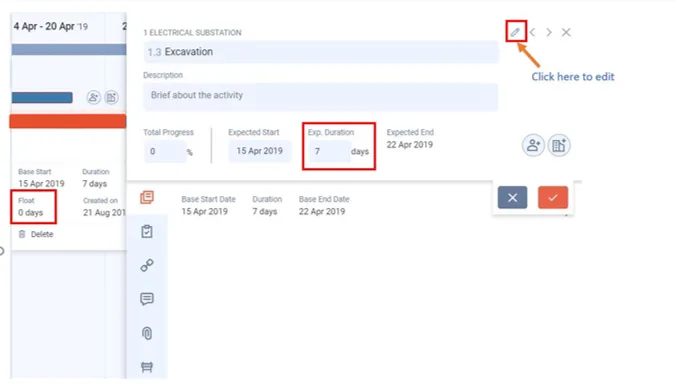
In the image, Float is 0. Float is the number of working days an activity can be delayed without changing the project end date (total float). A float of 2 means you can delay the activity's start, or extend its duration, by 2 working days without affecting the project end date. With a float of 0, any delay to the start or extension of the duration also delays the project end date.
To change the duration without opening the detailed view, drag the right end of the activity bar to the new end date. Watch the video:
Last updated 2020-05-20. Part of Masterplan in the Lean PlanDo manual. Lean PlanDo by Lean Station.