
Lean PlanDo manual › Masterplan
Delete a milestone
Delete a milestone from the three-dots menu in the Masterplan, or from its widget in the Masterplan or Lookahead Gantt chart.
You can delete a milestone in two ways.
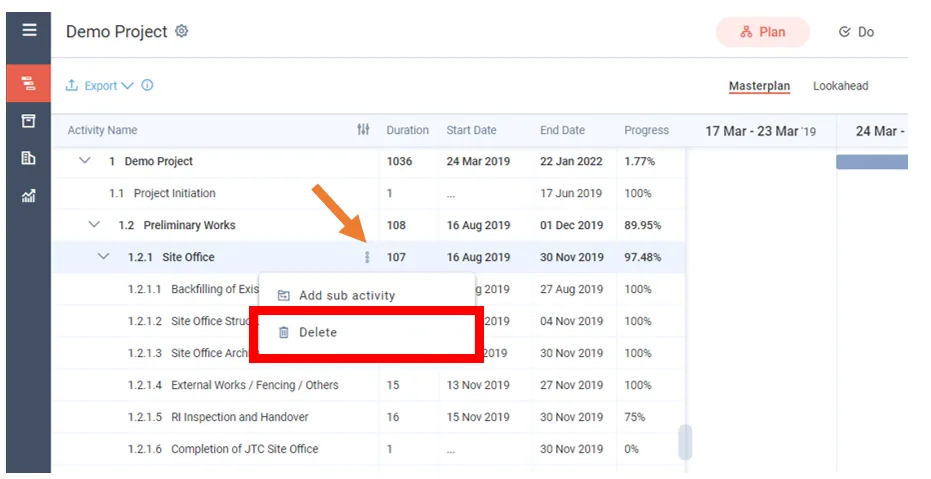
From the three-dots menu (Masterplan only)
- In the Masterplan, click the three-dots menu beside the milestone name.
- Click Delete.
- Click Delete again to confirm.
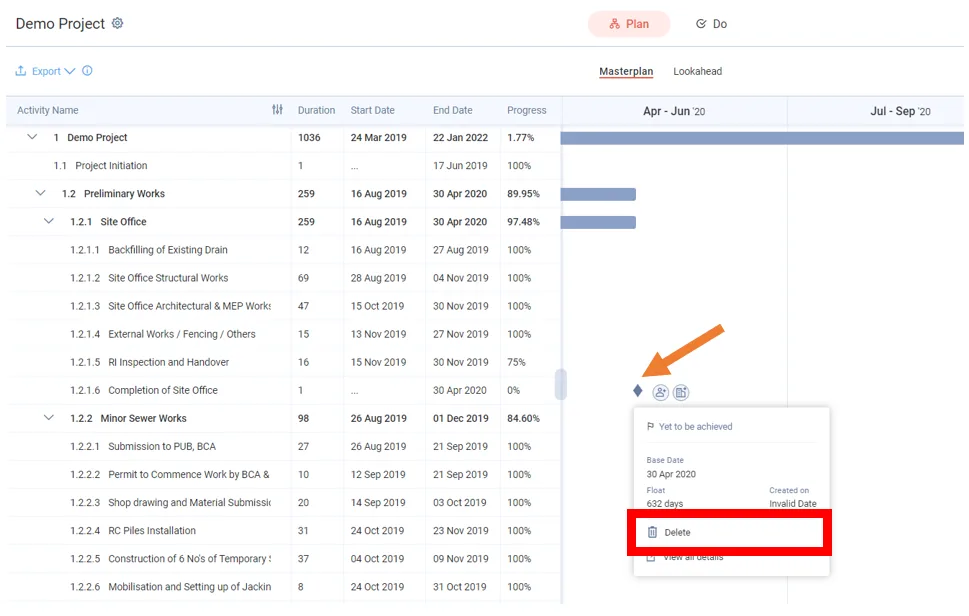
From the milestone widget (Masterplan or Lookahead)
This works in the Gantt chart of both the Masterplan and the Lookahead (the 6-week or 8-week plan where activities are broken down into smaller tasks).
- Click the milestone once to open its widget.
- Click Delete.
- Click Delete again to confirm.
Watch the video to see how to add or delete a milestone:
Last updated 2023-07-10. Part of Masterplan in the Lean PlanDo manual. Lean PlanDo by Lean Station.